

Online training sessions were becoming increasingly popular, even before the pandemic.
Lockdowns around the world means that there was a huge decline in interest for attending physical events and webinars. Since the world has started to open back up, online training delivered via Zoom, Teams or Google Meets have continued to be a popular mode of delivery.
Remote classrooms and online workshops present additional challenges for trainers and educators. It can be challenging to keep people engaged during an online session, as, it is more difficult to interact naturally via a screen.
There’s also the additional challenge of juggling with technology; making sure that everyone can see your screen and that you’re not accidentally on mute!
At Panda, we use a range of various digital tools in our online courses to keep learners engaged and focused, whilst also creating an enjoyable online learning experience.
From our experience over the last 3 years, these digital tools are the ones we have found to create engaging classes that enable us to interact with learners in different ways. Below you will find a list of some of the most useful digital tools for trainers of all backgrounds to think about using the next time you want to add some additional value to your sessions.
So, what are today’s top digital tools for trainers? Here’s a handy list that we’ve put together for you!
All of these tools are useful for both online and offline learning, so you’ll still be able to use these during future real-life training sessions too!
See also: How to setup and run a live online training session
1. Canva
Canva is your one-stop graphic design shop! It’s become the go-to tool for millions of creative professionals around the world. Canva is incredibly easy to use and it’s free to get started, although there is a premium version with a monthly or annual fee that has additional features.
You can use Canva for things like:
- Presentations and slide decks
- Resources, handouts, worksheets and templates to share with learners
- Infographics, diagrams and other visual media
- Promotional graphics
It even has animations, videos and audio so you can design your educational presentations to be dynamic, engaging and interactive. You can even export your finished design into PowerPoint or present directly from within Canva.
2. Prezi
Prezi is an online presentation tool, you can design, create and share content using Prezi. With Prezi’s motion and interactivity, you can show additional context or make your topic feel more dynamic and entertaining than a traditional PowerPoint slideshow.
There are dozens of pre-made templates you can use and edit to suit your needs, such as this interactive lesson plan that’s been laid out like a board game!

Your Prezi designs can be shared online, as well as exported for use as a video which is great for repurposing your content for other online platforms.
3. Padlet
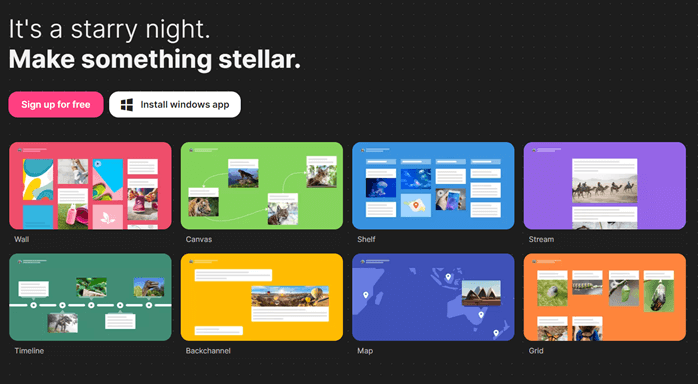
Now it’s time to make your entire classroom into a digital resource! Padlet is a digital tool for teachers and trainers that acts as an online notice board for communication, collaboration and sharing information.
Some of its features include:
- Collaborative remote notetaking
- A document hub for sharing and storing files
- An interactive whiteboard for learners to write on during sessions
- Online bulletins and notices
This is an opportunity to continue your relationship with learners after a course has finished, you can use Padlet to keep them engaged.
4. Mentimeter
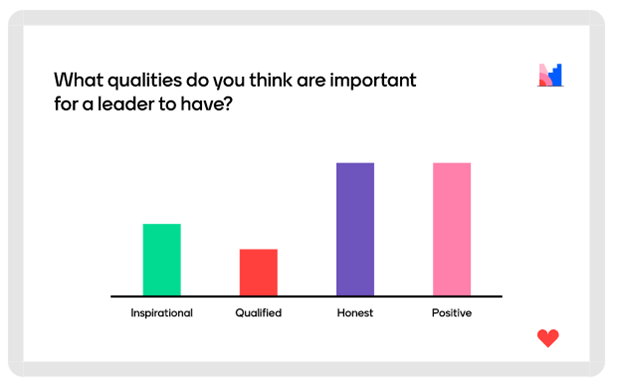
Mentimeter is another interactive presentation tool, however where it really shines is with its polling and assessment capabilities.
During a live training session, you can use Mentimeter for live polls, quizzes, Q&A and open responses to allow learners to interact with the content. It’s a highly visual tool, giving instant results in the form of graphs and charts that are highly visually appealing.
5. Slido
Slido has similar features to Mentimeter but it has a huge advantage – you can use Slido within an existing PowerPoint presentation with a free plugin. Mentimeter also has this feature, but it’s only available on the ‘paid’ plans.
Interactive quiz and polling tools are effective at keeping people engaged, and allows everyone to be equally involved. Larger online sessions are daunting for learners, they may not have the opportunity to ask a question, or other, louder voices may dominate during discussions.
Tools such as Slido allow everyone to participate with ease.
6. Quizalise
Quizalise is an advanced quiz tool that’s perfect for use in webinars and virtual classrooms. A few of the other tools on this list can also handle quizzes, so why do you need Quizalise as well?
From an assessment point of view, Quizalise allows the trainer to provide tailored resources to learners according to their results. Therefore, those who require additional support can be given the right information to help them improve.
This tailored approach to sharing information gives a better experience to the learner.
Summary
We’re always experimenting with new tools for our online courses and training.
We recommend that you should always be on the lookout for innovative and affordable digital tools to help enhance your online courses. We focus on tools that promote increased participation, collaboration, engagement, and fun, of course!
While it’s easy to overdo it or become overwhelmed by the sheer volume of different tools available online, most are free or very low-cost with trials available. You can always try out a new piece of software to discover whether it’s right for you before you make a commitment.
If you want help in how you plan great sessions, try our online learning course How to plan a training session
What digital tools have you been using recently to make your sessions shine?
[/et_bloom_locked]